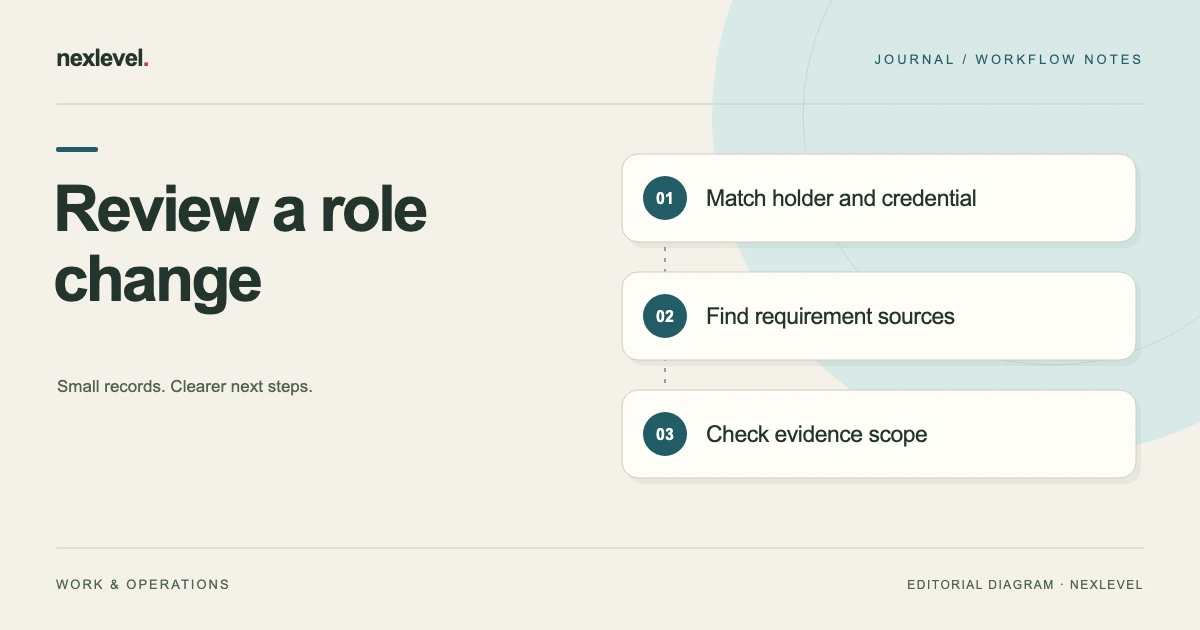
For a role change, compare the selected holder’s records with the actual requirement sources for the changed responsibility. Preserve earlier evidence and renewals, then name any applicability question for the responsible reviewer. A new requirement template does not renew a credential or approve the role.
Review the changed requirement without rewriting history
- Identify the holder, credential and the precise responsibility being reviewed.
- Record the earlier and proposed requirement sources and template versions.
- Check what the selected evidence establishes and what remains unavailable or unclear.
- Prepare a scoped report with the intended masking and a named next reviewer.
Working fields:
Holder/credential | Earlier role/source | Proposed role/source | Requirement version | Evidence occasion | Open question | Next reviewer
Useful next steps: Use the credential register template, Keep renewal events and evidence history intact, Hand the review to the next owner.
Define the role-review scope
Name the actual task: review the selected holder’s records against identified sources for a changed responsibility. That is narrower than declaring the person qualified for every aspect of a new role.
Record the source cutoff and intended recipient where relevant. A dated copy can be accurate at its own scope without representing every later issuer or organizational change.
VeraDue’s current listing organizes entered credentials, evidence, dates, and requirements. It does not verify issuer records or decide regulatory compliance.
Match the holder and selected credential
Similar names or credential labels can belong to different holders or records. Use the actual private identity context before changing any date or evidence reference.
The current product supports masked credential numbers that are revealed by choice. A display control helps manage exposure; it does not independently establish authenticity or recipient authorization.
Keep role-review labels as companion context unless the actual interface supports a relevant field. Do not invent an automatic job-to-credential mapping service.
Use a role-change review worksheet
Suggested fields are holder reference, selected credential, actual requirement source, template version, evidence reference, entered dates, current question, next reviewer, and intended report scope.
| Source role | Question to preserve |
|---|---|
| Requirement | Which actual source applies to this review? |
| Evidence | What does the selected document establish? |
| Register status | Which entered dates and fields produce it? |
| Decision | Which responsible process answers remaining questions? |
These are independent review concepts. They do not turn the worksheet or app into an issuer or professional approval authority.
Work through a fictional changed context
Imagine holder H7, credential C5, earlier evidence E1, and selected requirement context T2. A new role-review packet introduces a source question about whether T2 remains the applicable basis.
The reviewer preserves E1’s historical meaning and identifies the actual new source. They do not overwrite earlier dates merely to make the current view match a proposed requirement.
If applicability remains unclear, retain that precise question for the responsible reviewer. The example supplies no real licensing condition or legal interpretation.
Keep requirement versions separate from renewal events
A new requirement template and a new credential renewal are different changes. Updating a planning structure does not establish that an issuer renewed a credential.
VeraDue’s current description includes reusable versioned requirement templates and renewals that preserve prior dates. Check actual plan access and supported workflow.
For the renewal task, use the evidence-history guide. The role-change review should retain its actual outcome without turning it into a new renewal source.
Inspect evidence for its actual scope
Open the selected source through the authorized arrangement when the task requires content review. A filename or attachment reference can locate evidence without establishing its meaning.
The current listing supports metadata-only evidence when a user chooses not to store a file. Describe that actual retention state honestly rather than claiming a document was inspected when only a reference was available.
A source may establish an earlier occasion while leaving the changed role question unanswered. Preserve both the useful historical fact and the current limitation.
Keep Ready and Missing within register scope
VeraDue’s current description includes Ready, Expiring, Expired, and Missing views based on entered dates and evidence. Those organize review rather than independently verifying professional status.
A missing file in the selected register is not automatically proof that the holder lacks the underlying credential. A ready-looking label is not an issuer confirmation.
The role-review explanation should identify what the actual source establishes and which question remains outside the app’s organizational role.
Review reminders without inventing a legal deadline
The product describes configurable local renewal reminders and plan-dependent multi-stage options. A reminder is a prompt, not a renewal submission or an issuer check.
Inspect the actual selected reminder context after a supported record change. Do not assume a reminder on one device is automatically delivered to another reviewer.
This guide recommends no universal lead time or legal notice rule. Use the actual relevant sources and appropriate responsible advice for real deadlines.
Prepare a dated report with clear scope
The current Pro description includes PDF readiness reports and CSV registers, with requirement versions and identifier-masking choices.
Open the actual output. Check holder scope, selected credentials, evidence context, report date, requirement version, and masking choice. Do not assume every independent worksheet detail appears automatically.
A dated report is a representation of entered information, not a live issuer feed or a compliance certificate. Its preparation date should not become a new issue date for older evidence.
Keep private access proportional
A role-review packet may need only selected credentials and source routes. It does not automatically require disclosure of every identifier or unrelated personal record.
Use the actual intended authorization and organizational arrangement. The app’s local storage and masking features do not decide who may receive a particular output.
For a transfer to another reviewer, use the separate credential handoff guide. The current review can identify the bounded question and appropriate source without inventing team synchronization.
Correct the right layer
If the working evidence and dates are accurate but the cover note says they establish a broader role approval, repair the cover explanation.
If an actual record mistake is established, use the supported workflow and inspect the resulting source. Keep historical evidence and later clarification distinguishable.
A changed note does not automatically update a retained export elsewhere. Identify the intended current copy through the actual private arrangement.
Test one requirement-to-evidence relationship
Ask an authorized reader to reconstruct H7/C5/E1/T2. They should identify the historical evidence, selected requirement source, register status role, and remaining changed-context question.
If they infer issuer verification from a dashboard label, clarify the boundary. If they cannot reach the actual source, improve the private route.
A short review receipt identifies actual sources inspected, output checked, established result or limitation, and next responsible review. It does not determine legal authorization or professional eligibility.
Build the fictional role-review packet
The first row identifies H7 and the selected credential C5 using appropriate private source context. A broad role title is not enough to identify the person or document. Keep unrelated personal identifiers out of a general summary unless the actual task and authorization require them.
The second row identifies E1 and its actual occasion. It may remain useful historical evidence even when the new role question is unanswered. Do not overwrite its source dates merely to make the current register look aligned with a proposed requirement.
The third row identifies T2 and the source that establishes its selected context. A reusable requirement template is a planning structure entered by the user. It does not independently determine legal applicability or prove that a person satisfies every condition associated with a role.
The fourth row states the changed-context question. For example, the actual reviewer may need to establish whether a selected source remains relevant after the responsibility change. Keep that question explicit rather than guessing from a familiar credential name or an old dashboard label.
The fifth row records actual evidence access. If the reviewer had only a metadata reference, say so. If the actual authorized source was opened, describe the bounded content check. Neither result should be exaggerated into issuer verification that did not occur.
The sixth row identifies the intended report and masking choice. Open the actual copy and inspect it. Do not assume that a protected on-device view automatically gives every exported representation the same display state or privacy scope.
The final row names the next responsible review and source cutoff. A prepared packet can be accurate while still retaining a question. It should not create a completed-looking professional approval simply because the report’s date is current.
Test historical continuity and current meaning
In one fictional branch, the actual source establishes that the selected historical evidence remains relevant to the bounded review. Record that source relationship without extending the conclusion to unrelated credentials or every aspect of the role.
In another branch, the source establishes a new requirement context. Preserve the earlier evidence and identify the new actual question. A requirement change is not automatically a renewal event, and the app’s versioned template capability should not be described as issuing a new credential.
If the source remains unclear, retain the question and next owner. Do not mark the register ready merely to remove a missing or expiring-looking item. The dashboard organizes entered information; it does not settle the external eligibility question.
Now inspect reminder context. A supported update can change a prompt while leaving the original source evidence intact. Keep those roles separate. A reminder does not submit a renewal, retrieve an issuer record, or notify every reviewer automatically.
For actual output, check available plan access. VeraDue’s current Pro description includes requirement templates, evidence history, multi-stage reminders, and PDF/CSV exports. A companion summary can explain a question without being described as an app-generated readiness report when no such output was produced.
Ask the recipient to reconstruct H7/C5/E1/T2. They should identify what the historical source establishes, what the current role-review source establishes, and what remains unresolved. If they infer legal authorization from a local status alone, improve the explanation.
Also distinguish the report-preparation date from issue, renewal, and source-review dates. A new PDF does not make an older document newly issued. That distinction helps a later reader understand the record without treating every current-looking date as the same event.
The final receipt should name actual sources inspected, scope reviewed, intended copy checked, established result or limitation, and next responsibility. It should not certify compliance or decide professional eligibility. A bounded source-aware result gives the responsible reviewer a practical starting point for the separate decisions the app does not make.
Review masking in the actual intended output, not only the working screen. A chosen display state and an exported report can have different scopes. The current product describes identifier-masking choices, and the prepared copy should establish what the recipient will actually see.
If the task needs only a bounded evidence question, avoid adding unrelated identifiers for appearance. Keep the actual authorization and private source route in the responsible arrangement. The app’s local storage does not itself decide disclosure permissions.
This also gives the role-change review a practical ending. The reader can identify H7, C5, the source context, and the next question without mistaking a current report date for a newly issued credential. A precise limitation is preferable to a broad ready label that implies issuer verification or regulatory acceptance the selected record does not establish.
A useful question line names both contexts: “Holder [reference], credential [reference], earlier role [source], proposed role [source], requirement relationship [established or unresolved], next reviewer [name].” Completing that line should not require changing the credential itself. The role review can explain a new administrative question while preserving the holder, original evidence and earlier renewal event.
Use VeraDue for a source-aware register
VeraDue connects entered credential dates, evidence history, requirement versions, masking choices, and local reminders. Its current Pro description expands holders, templates, evidence, reminders, and reporting.
Check the official VeraDue App Store listing for current features and plan details. Preserve history while reviewing the changed context, and keep actual issuer and regulatory decisions with their appropriate sources.